|
Create
HTML or Text newsletters
|
| |
|
|
With
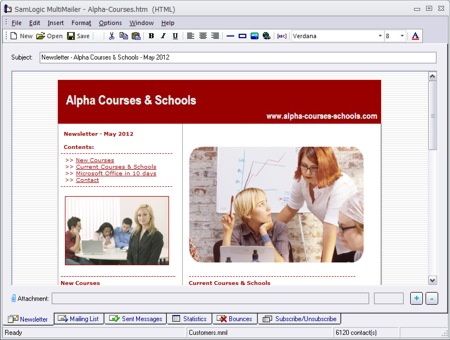
SamLogic MultiMailer you can create impressive HTML newsletters
or plain text newsletters. HTML newsletters may include pictures,
lists, tables, colors, fonts etc. It is also possible to include
sound, for example music, in HTML newsletters!
You can insert data fields in
the message. Data to the fields are read from the built-in
database. The data fields will give you the possibility to create personalized
e-mail messages. You can for example start the message with a greeting
and a name (like "Hi John Smith!"). Data fields can be used both in the
subject field and in the body text.
You can also include attachments
with your e-mail messages, for example PDF files. |
|
 |
|
|
|
|
|
Mailing list management
|
| |
|
|
SamLogic MultiMailer contains a built-in database that is used to
manage your mailing lists. E-mail addresses and other contact information can be imported from
other programs such as Microsoft Outlook,
Microsoft Excel,
Microsoft Access,
Oracle
etc., or added directly in the program.
You have great possibilities
to filter and select recipients in the mailing list. You can send
to all recipients, to selected recipients or to specified categories
of contacts.
This gives you a possibility to create highly targeted e-mail campaigns.
To prevent sending same newsletter
more than once to same recipient, duplicates
can be removed. The program can also handle unsubscribe requests
and block specific e-mail addresses from having more e-mails. |
|
 |
|
|
|
|
|
E-mail delivery status
|
| |
|
|
The
status tab in
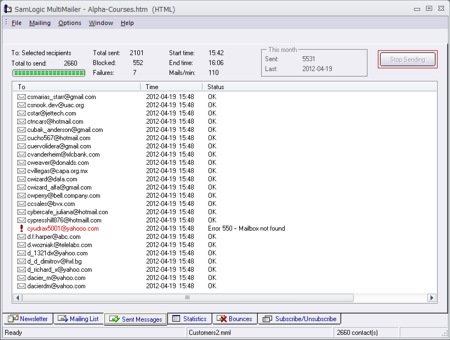
SamLogic MultiMailer gives you continuing information
about the e-mail delivery process. The status tab shows a detailed list
about which messages has been sent and which have been aborted due
to errors. This information is also stored in a log file for following-up
and maintenance.
SamLogic MultiMailer always tries to process as many
e-mail addresses as possible from the mailing list, and never stops sending
in case of an error in an e-mail address. Sometimes an error can
be temporary and it is easy to resend to e-mail addresses that
had temporary errors. |
|
 |
|
|
|
|
|
Statistics
|
| |
|
|
In the
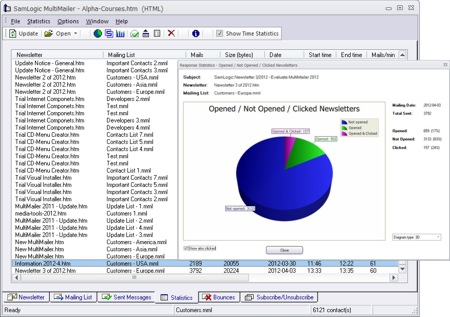
statistics tab in MultiMailer you will find detailed information about
all your mailings. You can for example see the e-mail delivery
date, number of e-mails that was sent, which mailing list that
was used etc.
You can also see how many newsletters that was opened by your
recipients, and who of the recipients that opened the
newsletters. You can also see who clicked on the links in the
newsletter, and which links they clicked on. More information
about these powerful statistics functions is available on
this
page.
From the statistics tab you can also open previous newsletters
and mailing lists in an easy way. |
|
|
|
|
|
|
|
|
|
|
Handling
of e-mail bounces
|
| |
|
|
If you
send e-mails frequently, it is inevitable that some of the e-mails
will bounce back. The reason can be that the contact has changed
his/her e-mail address, the e-mail address was incorrect from the
beginning, the mail server is down or the recipient's mail box is
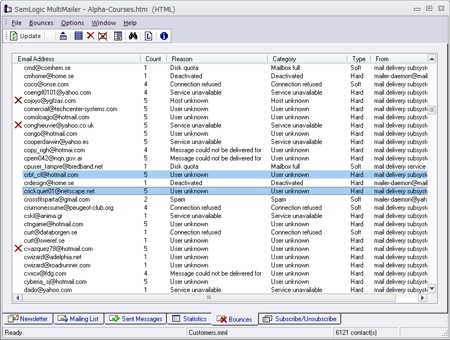
full. The Professional version of MultiMailer has powerful functions
to handle e-mail bounces and can give you a detailed report of which
contacts that generated the bounces. The program can also block
bouncing e-mail addresses from having more e-mails, so you don't
need to send out more e-mails than necessary.
You can read more about MultiMailer's handling of e-mail bounces
on this page. |
|
 |
|
|
|
|
|
Handling
of subscribe & unsubscribe requests
|
| |
|
|
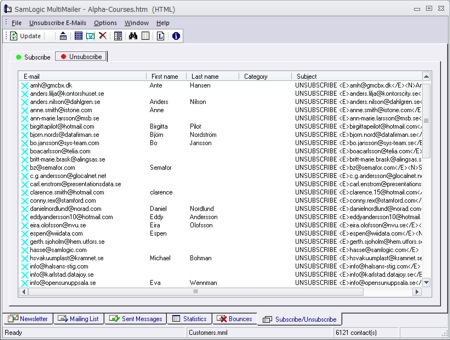
Contact
lists that contain e-mail addresses are constantly changing. New
subscribers appear almost every day and other want to unsubscribe
the newsletter for some reason. It can be time-consuming to
handle this manually, and it is easy to make mistakes. For that reason
there is built-in support for handling of subscribe
and unsubscribe requests in MultiMailer.
The program co-operates with web forms that can be used to
collect subscribe and unsubscribe requests. Web forms for change
of e-mail adddresses in also included.
More information about MultiMailer's handling of subscribe and
unsubscribe requests is available on
this page. |
|
|
|
|
|
|
|
|
|
|
|