SamLogic MultiMailer 2024 - News

Below you find a list with some of the new features that have been added
to the latest version of the newsletter / e-mail software SamLogic
MultiMailer 2024.
|
New features in
SamLogic MultiMailer 2024 (all versions) |
|
|
-
 Clickable
phone number. You can now insert a clickable phone
number in the email text. If the reader clicks on the phone
number, the phone number will be called. You can insert the
phone number either as a pure text link or as a graphical
phone symbol. Clickable
phone number. You can now insert a clickable phone
number in the email text. If the reader clicks on the phone
number, the phone number will be called. You can insert the
phone number either as a pure text link or as a graphical
phone symbol.
-
Improved delivery wizard. In the last step of the
wizard you can now get a detailed summary on the e-mail
delivery that you are going to start.
-
 Buttons.
We have added more settings for buttons in newsletters. Buttons.
We have added more settings for buttons in newsletters.
-
X.
MultiMailer now supports X. This replaces the former support
for Twitter.
-
Standard
fields/columns can be renamed. You can now rename some of the
standard fields/columns in MultiMailer to your own names, that may
suit your company better.
-
Subject line. MultiMailer
now tests that the subject line of the e-mail newsletter is
not too long. Too long subject lines should be avoided.
-
Link control. MultiMailer
does more tests of clickable links in newsletters before the e-mail delivery
start. If a bad link is found, a warning message is shown
and you have the possibility to correct the link.
-
Easier to
edit pictures, links, titles and text boxes via new commands
in the Edit menu.
-
Supports the
new email sender guidelines from Google and Yahoo.
In February 2024 Google and Yahoo introduced new tougher
sender
guidelines regarding e-mail delivery and
SPF,
DKIM and
DMARC,
and MultiMailer 2024 supports these new sender guidelines.
|
|
|
|
New features in
SamLogic MultiMailer 2024 / Professional & Enterprise |
|
|
-
 Maps.
You can now insert a link to a map in a newsletter. If the
e-mail receiver clicks on the link, a map is opened with a
specified address shown and visually marked. Google Maps is
used to show the map and the visual mark. Maps.
You can now insert a link to a map in a newsletter. If the
e-mail receiver clicks on the link, a map is opened with a
specified address shown and visually marked. Google Maps is
used to show the map and the visual mark.
-
A temporary
exclusion list (with temporary excluded e-mail addresses)
can now be loaded automatically when MultiMailer starts.
-
New servers.
New faster servers for handling of open and click statistics
and for web copies of newsletters.
-
Enhanced bounce
rate control during e-mail delivery. Keeping the bounce rate
at an acceptable level is very important today and
MultiMailer has improved the built-in realtime control of
the bounce rate during an e-mail delivery.
|
SamLogic MultiMailer 2022
Below you find a list of some features that
were added to the 2022 version of SamLogic MultiMailer.
|
New features in
SamLogic MultiMailer 2022 (all versions) |
|
|
-
Supports the new
Microsoft Windows 11.
-
 Spell
check. MultiMailer can now check your spelling and
inform you if any word in your email newsletter is
misspelled. A misspelled word is shown with a red underline. Spell
check. MultiMailer can now check your spelling and
inform you if any word in your email newsletter is
misspelled. A misspelled word is shown with a red underline.
-
Emojis. MultiMailer now supports emojis. An emoji is
a small graphical symbol (for example:
🍓) that
can be placed both in the body text and in the subject line.
-
Buttons.
You can now add clickable buttons to your email newsletters.
The buttons can be of any color.
-
Titles.
You can now add special title tags to your newsletters. This
will make your newsletters more accessible.
-
Read receipts
are now supported. MultiMailer can now ask for a read
receipt when an e-mail is opened.
-
Syntax
control
of e-mail addresses. MultiMailer can now check that the
e-mail addresses in your mailing lists are valid before it
starts an e-mail delivery.
-
Improved
compatibility with Gmail och iPhone.
MultiMailers warns if any compatibility issue is detected.
-
TLS 1.2.
MultiMailer supports now the more secure TLS 1.2 protocol.
TLS is a cryptographic protocol that is used to encrypt
messages between the client and the server.
-
Favorite
folders. MultiMailer now handles favorite folders for
newsletters and other files.
|
|
|
|
New features in
SamLogic MultiMailer 2022 / Professional & Enterprise |
|
|
-
Secure HTTPS links are now used to documents and newsletter
copies.
-
Control
addresses. MultiMailer now handles control addresses.
Control addresses can be used to monitor an e-mail delivery
and also used to let people inside or outside your
organization get your newsletters in a regular basis.
-
You can now
create one unique unsubscribe list per newsletter or per
sender. This is useful if you have more than one newsletter
and you want to let the readers unsubscribe from a specific
newsletter.
|
SamLogic MultiMailer 2019
Below you find a list of some features that
were added to the 2019 version of SamLogic MultiMailer.
|
New features in
SamLogic MultiMailer 2019 (all versions) |
|
|
-
A visual ad
wizard is now included in MultiMailer.
-
A framed rectangle can now be inserted in the newsletter at
any position.
-
You can password
protect access to MultiMailer. Only people with the correct
password can start MultiMailer and get access to your
mailing lists etc. Mailing lists can also be encrypted so
the contents is unreadable outside MultiMailer.
-
MultiMailer now
supports and handles GDPR.
-
Improved import
and export functions.
-
Easier to manage
header and footer pictures. It is now very easy to change
and update them after a newsletter has been created via
MultiMailer's newsletter wizard.
-
Easier to attach
more than one file (for example PDF documents) with an
e-mail message.
|
|
|
|
New features in
SamLogic MultiMailer 2019 / Professional & Enterprise |
|
|
-
 Improved
co-operation with Microsoft Outlook, Microsoft Exchange och
Office 365. MultiMailer handles now NDR reports (Non-Delivery
Reports) creted by Exchange or Office 365. Improved
co-operation with Microsoft Outlook, Microsoft Exchange och
Office 365. MultiMailer handles now NDR reports (Non-Delivery
Reports) creted by Exchange or Office 365.
-
The subscribe
form can now have your company's logotype on it. The
subscribe form also supports a check box with a consent
text, as required by GDPR.
-
MultiMailer
starts much faster now - also if you have lot of data.
-
The report
function in MultiMailer has been updated.
|
SamLogic MultiMailer 2017
Below you find a list of some features that
were added to the 2017 version of SamLogic MultiMailer.
|
New features in
SamLogic MultiMailer 2017 (all versions) |
|
|
-
MultiMailer now
supports tables. You can now add and edit tables in
MultiMailer. You can choose the number of rows and columns,
and choose colors, alignment and other properties for the
tables.
-
MultiMailer now supports 4K / 192 DPI high resolution
pictures. This improves the picture quality in 4K monitors
and in smartphones and tablets a lot.
-
MultiMailer now
supports graphical titles.
-
MultiMailer's
newsletter wizard now supports LinkedIn, Instagram och
YouTube.
-
MultiMailer can
now paste formatted text from Microsoft Word. MultiMailer
and Microsoft Word are not directly compatible with each
other, but via a special paste function you can paste
formatted text from Word to MultiMailer.
-
All e-mail
messages are automatically converted to Unicode (UTF-8)
before they are delivered. This ensures that the text -
including localized special characters - can be read all
over the world.
|
|
|
|
New features in
SamLogic MultiMailer 2017 / Professional & Enterprise |
|
|
-
Product gallery. We have added a new function to
MultiMailer - a product gallery - that helps you organize
and present your articles in newsletters in a better way.
-
 MultiMailer
can now show the current e-mail bounce rate directly in the
program. MultiMailer
can now show the current e-mail bounce rate directly in the
program.
-
MultiMailer can
co-operate with Amazon SES for the delivery of
e-mails.
-
The
List-Unsubscribe function has been updated and improved.
|
SamLogic MultiMailer 2015
Below you find a list of some features that
were added to the 2015 version of SamLogic MultiMailer.
|
New features in
SamLogic MultiMailer 2015 (all versions) |
|
|
-
 Supports
Microsoft Windows 10. Supports
Microsoft Windows 10.
-
MultiMailer now supports 4K / 192 DPI high resolution
pictures. This improves the picture quality in 4K monitors
and in smartphones and tablets a lot.
-
MultiMailer now
supports graphical titles. By using a graphical title you
can use any font you want for the text and don't need to
worry about that the receiver does not have the font
installed in his/her device.
-
All e-mail
messages are automatically converted to Unicode (UTF-8)
before they are delivered. This ensures that the text -
including localized special characters - can be read all
over the world.
|
|
|
|
New features in
SamLogic MultiMailer 2015 / Professional & Enterprise |
|
|
-
A new function that handles e-mail address change requests
in an easy way has been included. People often change their
e-mail addresses and we have made it easier to maintain
these changes.
-
Subscriptions
and unsubscriptions are handled much faster than before.
-
MultiMailer can
now inform you via e-mail when an e-mail delivery is
completed. This is useful if you send large number of
e-mails. You don't need to monitor your computer. You can
leave it and get a report mail sent to for example your
mobile phone, when the delivery is finished.
|
SamLogic MultiMailer 2014
Below you find a list of some features that
were added to the 2014 version of SamLogic MultiMailer.
|
New features in
SamLogic MultiMailer 2014 (all versions) |
|
|
-
Supports
Microsoft Windows 8.1.
-
We have added a
Create Link menu to MultiMailer's user interface. In
this menu you will find all functions that handles clickable
links in email newsletters.
-
 Support
for
OneDrive. By using Microsoft OneDrive you can share
newsletters, mailing lists and other information between
different computers that are connected to the Internet. Support
for
OneDrive. By using Microsoft OneDrive you can share
newsletters, mailing lists and other information between
different computers that are connected to the Internet.
-
Improved
Twitter function.
-
Improved test
and preview function. For example, you only need to press
Ctrl-T when you want to make a test.
|
|
|
|
New features in
SamLogic MultiMailer 2014 / Professional |
|
|
-
Improved upload function for web copies of newsletters. The
function is compatible with more firewalls, and the error
handling has been improved.
-
You can now
insert icons and symbols in newsletters in an easy way. Many
ready-to-use icons and symbols are included, for example
icons for PDF, Word, Excel, video clips, Facebook, Twitter,
LinkedIn, WinZip etc.
-
Automatic check
of unsubscribe links. Before MultiMailers starts an email
delivery process, it checks that the unsubscribe link is
correct.
|
|
|
|
New features in
SamLogic MultiMailer 2014 / Enterprise |
|
|
-
Can now handle
mailing lists with 500,000 contacts each.
-
Supports
encrypted SSL communication with email servers.
-
Increased
support for Microsoft Windows Server 2008 and 2012.
-
Support for
virtual machines.
|
SamLogic MultiMailer 2013
Below you find a list of some features that
were added to the 2013 version of SamLogic MultiMailer.
|
New features in
SamLogic MultiMailer 2013 (all versions) |
|
|
-
Supports
Microsoft Windows 8.
-
Better support
for international characters. MultiMailer supports now all
characters in the Unicode character system. So you
can now create and send newsletters in languages like
Chinese, Japanese, Thai, Russia, Arabic, Hebrew etc. The
receiver will be able to read the newsletter in the
specified language regardless of which language his/her
operating system uses. Unicode allows this.
-
 Twitter
is supported. You can now publish a tweet (Twitter message)
directly from the program. So when you send out a newsletter
you can also inform about your newsletter on Twitter in an
easy way. Twitter
is supported. You can now publish a tweet (Twitter message)
directly from the program. So when you send out a newsletter
you can also inform about your newsletter on Twitter in an
easy way.
-
Support for
Dropbox and SkyDrive. This makes it easier to
share newsletter, mailing lists and other information
between different computers, for example between your home
computer and office computer.
-
Support for
Office 2013 (Excel 2013 and Outlook 2013).
-
Improved support for creation of newsletters that can be
read on smartphones and tablets.
-
Improved functions for finding and handling of doublets of
contacts.
-
The image
handler application
SamLogic Image Resizer has been improved. SamLogic Image
Resizer is included in the setup package of MultiMailer and
is used for adaption of images for the web and for
newsletters.
|
|
|
|
New features in
SamLogic MultiMailer 2013 / Professional |
|
|
-
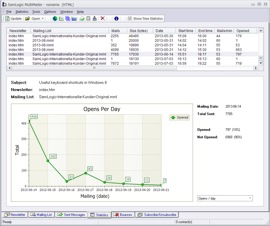 New
statistics and analysis functions. You can now see
when your contacts open your newsletters. You can see
the date and the time. New
statistics and analysis functions. You can now see
when your contacts open your newsletters. You can see
the date and the time.
-
Charts and
statistics can now be displayed directly in the
Statistics tab. You don't need to open a separate window
to view the information.
-
A new filtering
function in the Statistics tab. You can in an easy
way select mailing items by date and by name. This is very
useful if you need to export information from the
Statistics
tab.
-
Better handling
of e-mail bounces. More kind of e-mail bounces are
recognized. By maintaing your e-mail bounces in a proper way
you will get faster e-mail deliveries and a better open
rate.
-
Smarter
categorization of contact information during an import.
|
SamLogic MultiMailer 2012
Below you find a list of some features that
were added to the 2012 version of SamLogic MultiMailer.
|
New features in
SamLogic MultiMailer 2012 (all versions) |
|
|
-
A list of all
the clickable links, including link text, found in a
newsletter can now be displayed in a dialog box. Sometimes
it can be difficult to get an overview of all links and link
texts in a newsletter, but with this new feature you can see
this quickly and easily.
-
Export of
contact information from a mailing list can now be made
directly to a Microsoft Excel file. Both the. XLS and. XLSX
files are supported (Microsoft Excel 2002-2010).
-
The subject line
of a mailing is now displayed in the Statistics tab
of the program. You can see all the subject lines that you
have used in your e-mail campaigns in an orderly manner.
-
 Support
for Google+ (Google Plus). If you have created a page
on Google+; you can now insert a Google+ logotype and a link
in your newsletter that opens your Google+ page. If your
newsletter reader clicks on the logotype, your page on
Google+ is opened in user's web browser. This works in the
same way as the Facebook and Twitter logotypes that were
introduced in MultiMailer 2011.
Read
more. Support
for Google+ (Google Plus). If you have created a page
on Google+; you can now insert a Google+ logotype and a link
in your newsletter that opens your Google+ page. If your
newsletter reader clicks on the logotype, your page on
Google+ is opened in user's web browser. This works in the
same way as the Facebook and Twitter logotypes that were
introduced in MultiMailer 2011.
Read
more.
-
The newsletters
wizard is updated. Newsletter created by the newsletter
wizard in MultiMailer is now compatible with latest version
of Google Gmail. We have also developed a series of
new header pictures with a height of 100 pixels.
-
You can now add
a background that fades between two colors in your
newsletter.
Read
more.
-
The functions of
backup and restore of data has improved. Among other things
it is easier to recover information now.
-
 The
image conversion software SamLogic Image Resizer,
which optimizes images for web pages, blogs and newsletters,
is included. It can also be launched directly from the
MultiMailer for quick access. Read more about the program
on this information page for SamLogic Image Resizer. The
image conversion software SamLogic Image Resizer,
which optimizes images for web pages, blogs and newsletters,
is included. It can also be launched directly from the
MultiMailer for quick access. Read more about the program
on this information page for SamLogic Image Resizer.
|
|
|
|
New features in
SamLogic MultiMailer 2012 / Professional |
|
|
-
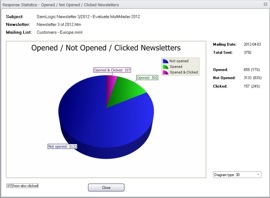 The
advanced statistics has been enhanced with new features,
among other things you can now see how many people that have
clicked on links in your newsletter, and you can also
see who of your contacts that clicked on links and
what links they clicked on. It is easy to make a selection
of those contacts that clicked on links in the newsletter
and for example send a follow up email to them.
Read more. The
advanced statistics has been enhanced with new features,
among other things you can now see how many people that have
clicked on links in your newsletter, and you can also
see who of your contacts that clicked on links and
what links they clicked on. It is easy to make a selection
of those contacts that clicked on links in the newsletter
and for example send a follow up email to them.
Read more.
-
Information
about clicked links is shown in the program in different
ways, but you can also create a detailed Excel compatible
overview report with the same information. This report also
displays other information, such as statistics on opened
newsletters.
Read more.
-
MultiMailer 2012
can show both the link text and the web address of a clicked
link in a newsletter. Sometimes the link text is more
interesting to view than the actual web address, if the link
text has a descriptive text. With the statistics functions
in MultiMailer you can see how many clicks a specific link
text has got, and you can compare different link texts with
each other.
-
An export of
contacts who opened a newsletter or clicked on links in a
newsletter can now be done. Information can be saved either
as an importable text file or Microsoft Excel file. This is
very useful, because information on who clicked on certain
links can now be redirected to other persons, such as
sellers and informers.
-
Information on
e-mail bounces, subscriptions and newsletter cancellations
can now be exported directly to Excel.
-
A campaign can
now be named in the mailing wizard. Sometimes we do not know
what a campaign should be named until it is time to send
out, and with this new functionality, you can name the
campaign just before mailing.
-
The program
interface has been updated and modernized. And new visual
themes have been added, so you can work with the graphical
interface that you prefer.
|
SamLogic MultiMailer 2011
Below you find a list of some features that
were added to the 2011 version of SamLogic MultiMailer.
|
New features in
SamLogic MultiMailer 2011 (all versions) |
|
|
-
Full support for
Microsoft Windows 7 and 64 bit Windows.
-
The newsletter
wizard has been improved. For example:
- a fully functional unsubscribe link can be automatically
added to the newsletter
- lots of new pictures for the newsletter's header and
footer
 -
7 languages are supported -
7 languages are supported
- clickable Facebook and Twitter logotypes (icons) can be
automatically added to the newsletter
-
Data can be
imported from Microsoft Excel 2010.
-
Smartphones and
mobile phones are now supported.
MultiMailer can create newsletters that can be read in
smartphones and mobile phones.
-
MultiMailer's
user interface has been updated. Now are small symbols used
in many of the lists to give extra information about list
items (for example contacts). And more visual themes for the
editor are available now, for example Office Aqua, Silver,
Black and Blue themes.
-
Frame color and
background colors for table cells in newsletters can now be
easily changed via a menu.
-
Data files, that
MultiMailer uses, can now be easily transferred between
computers. If you for example change computer or want to
synchronize data between two computers, a special program
that follows MultiMailer can be used.
-
A user´s guide
in PDF format is now included. A navigation tree and
hyperlinks in the user's guide's text makes it's easy to
navigate between the pages in the book.
|
|
|
|
New features in
SamLogic MultiMailer 2011 / Professional |
|
|
-
Web forms for
subscribe / unsubscribe / change address requests are now
available in 7 languages. The following languages are
supported: English, German, Spanish, Swedish, Norwegian,
Danish and Finnish.
-
A link generator
that creates links to MultiMailer's web forms has been
included. You can for example choose language or background
color for the web form, and the link generator will create a
ready-to-use HTML link that you can insert in your
newsletter or in your web page.
-
Compatible with
Microsoft Outlook 2010. Contact information can now
also be imported from Outlook 2010.
-
Can be run on
Windows Server 2008 (also R2).
-
Automatic
functions have been added. The program can download e-mail
bounces and subscribe / unsubscribe requests automatically
when the program starts. You can also press the F12
key to start a download anytime in the program. All lists
(that you choose) will be updated in one process.
-
All e-mail
bounces and subscribe / unsubscribe requests that are
downloaded are now logged in a history database. So whenever
you want you can examine a bounces history or check what
date a subscription happened.
-
A new insertable
field has been included:
LastDay.
This field returns the highest day number for the current
month. So if the month is March it will return 31 and if the
month is April it will return 30. This field makes it
easier, and more secure, to have time limited offers in
newsletters because you never need to change a date (if you
use the last day in month as a limit). It is recommended to
use this field together with the
Month
field.
|
A list with news and improvements in older
version of SamLogic MultiMailer can be found on
this page. If you want to go back to the product page for
MultiMailer, click here.
|
 |