CONTENT
 Foreword Foreword
Design
buttons that make impression
Tip:
Hide buttons in a menu
Tip:
Adjust the position of a button in a menu
Frequently
Asked Questions (FAQ)
Inspecta
presents reports with CD-Menu Creator
|
FOREWORD
This is newsletter number two in a series of three for
those who had tried or bought SamLogic CD-Menu Creator. In this issue we have included two articles that
describes the benefits of using menu interfaces for CDs,
DVDs and USB flash drives. We have also added two tips that
show how you can adapt the buttons in a menu to your purposes.
If you have questions about the menu designer tool SamLogic CD-Menu Creator or
have comments on the newsletter, you can send us an
e-mail. Our e-mail address is available at the bottom of
this newsletter.
Sincerely,
Anders Persson
SamLogic |
DESIGN BUTTONS THAT MAKE IMPRESSION
Good design is important nowadays. And most important is
often the first impression. When you distribute software
via a CD, DVD or USB flash drive you have the opportunity
to give your user a great first expression by adding a beautiful
and professional menu interface.
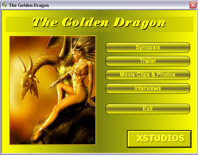
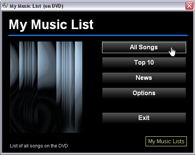
An important part of a graphical menu interface is the buttons
that the users clicks to launch programs or open documents
etc. With CD-Menu Creator you can create buttons with various
styles and you can use a lot of effects together with the
buttons, for example glass effects, reflections, shadows,
etc. Below we will show some button styles that can be created
with CD-Menu Creator:
Buttons with vertical color gradient
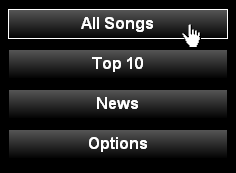
The picture above shows buttons that fades vertically between
two colors. In the top of a button gray color is used and
in the bottom of a button black color used. By changing
color from one color to another in this way a color gradient
effect is created.
Buttons with cylindrical color gradient
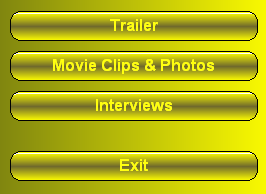
The picture above shows buttons with a cylindrical color
gradient, which also is combined with a light reflector
on the top of the button. This gives the illusion of a three-dimensional
metal surface, in this case gold.
Partially transparent buttons
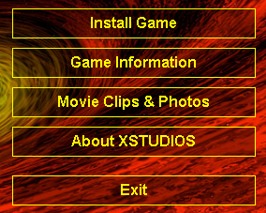
The picture above shows buttons that are partially transparent.
The background is partially visible trough every button.
In CD-Menu Creator you can choose how much of the background
that should be visible through the button (the buttons opacity).
For more examples of button styles you can click on the
links below to view our menu gallery:
Menu
Gallery 1 - examples of menus and buttons
Menu
Gallery 2 - examples of menus and buttons |
TIP:
HIDE BUTTONS IN A MENU
This tip describes how to hide a button in a menu. When
you hide a button all settings and properties for the button
are preserved, but the button is not shown in the menu interface.
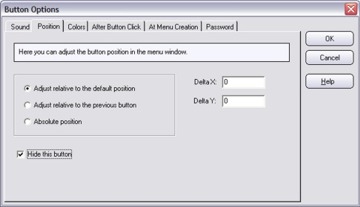
How
to create a hidden button in a menu |
TIP:
ADJUST THE POSITION OF A BUTTON IN A MENU
This tip shows how to adjust a button's X and Y position
in a menu. You can move a button to any place in a menu
interface and on this page we show you how to do this:
How
to adjust the button's position in the menu window
|
FREQUENTLY
ASKED QUESTIONS (FAQ)
 We have a FAQ page for
SamLogic CD-Menu Creator on our web
site and there you will find answers to common questions
about the product. If you want to take a look on our FAQ
page you can click on the link below: We have a FAQ page for
SamLogic CD-Menu Creator on our web
site and there you will find answers to common questions
about the product. If you want to take a look on our FAQ
page you can click on the link below:
SamLogic
CD-Menu Creator - Frequently Asked Questions
Below you will find a copy of some common questions and
answers, taken from the FAQ page:
Q: Can I test the menu before I burn it on a CD or DVD?
A: Yes, you can preview the menu and run it on your harddrive.
Q: Is it possible to create a CD/DVD with more than one
menu?
A: Yes, you can create menu interfaces with multiple menus.
In the help documentation for CD-Menu Creator you can find
a description and an example of how to create a menu system
with many menus. You can select the menu item "Help -
Contents" and then click on the "CD/DVD with more
than one menu" link to read a detailed description.
See also:
How to create multiple menus on a CD or DVD.
Q: I have an older version of SamLogic CD-Menu Creator.
Can I upgrade to the latest version for a lower price?
A: Yes, if you have an older of version of SamLogic
CD-Menu Creator you can upgrade to the latest version to
a reduced price. The current upgrade price is $49 (39 euro).
You can upgrade from this
order page.
|
INSPECTA
PRESENTS REPORTS WITH CD-MENU CREATOR
 -
What do you think is good with SamLogic CD-Menu Creator? -
What do you think is good with SamLogic CD-Menu Creator?
- Customer that have very little experience of computers
can in a simple way read our information.
It says Mats Henriksson of Inspecta. The company is a leading
inspection company in Scandinavia with over 1,250 employees
in Sweden, Finland and the Baltics. Furthermore, he says:
- We use the program to make stunning autorun menus for
CDs, where we report results of work against the customer.
When Inspecta do their surveys the store the result in comprehensive
reports, often consisting of multiple PDF documents. Then
they put the documents on CDs which they give to their customers.
Inspecta uses CD-Menu Creator to create a menu interface
on the CD and link every button to a PDF document. When
the CD is inserted in the drive the menu is shown automatically
and the user can immediately open a report by clicking on
a button.
Inspecta has created various menus that they uses as templates
when they need to create a new menu. The inspectors uses
laptops when they visits their customers so they can directly
create CDs with a report of the survey results.
Inspecta - Short company descriptionn
Inspecta's Swedish operation consists of 550 employees who
are located in 20 different places in Sweden. The company
is divided into three divisions:
 -
Inspecta Sweden -
Inspecta Sweden
Provides services in inspections, testing, product and personnel
certification, consulting and training.
- Inspecta Nuclear
Approved environmental auditor to conduct review of Swedish
nuclear power plants, and also offers advice and training
in the nuclear field, and assists in matters that include
regulations and standards.
- Inspecta Technology
Is a technical consultancy specializing in materials, strength,
fracture mechanics and the risk and safety assessments.
For more information, visit
Inspectas
web site.
More information about CD-Menu Creator
For more information on how to create menus, you can
read the product page for
SamLogic CD-Menu Creator.
|
|
|
Order the latest
CD-Menu Creator 2012!
The latest
version of the menu designer tool CD-Menu Creator is
2012.
This version supports Windows 8 & 64-bit Windows. The menus
that are distributed are code signed which allows distribution
to restricted environments.
|
|
|