ActiveX: CalendX6Mon
(6 Months Calendar Component)
(filename:
SLX6MON.OCX)

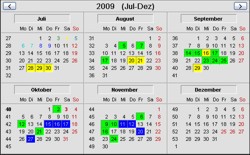 CalendX6Mon
is an international calendar that shows 6 months at a time. The calendar
can show country specific public holidays and week numbers according to
the ISO 8601 standard. Holidays are displayed with another text color
than the other days. The calendar has built-in logic to calculate when
movable holidays, for example the Easter, occur. CalendX6Mon
is an international calendar that shows 6 months at a time. The calendar
can show country specific public holidays and week numbers according to
the ISO 8601 standard. Holidays are displayed with another text color
than the other days. The calendar has built-in logic to calculate when
movable holidays, for example the Easter, occur.
The default language for the calendar component is English, but you can
easy change to other languages by loading external country files to the
calendar. These files contain month names, day of week names and other
country specific text. The country files also contain information about
public holidays in the country. Country files for USA, United Kingdom,
Germany, France, Spain, Italy, Sweden, Norway, Finland and Denmark are
included, but you can easy create your own country files.
Dates can also be selected in the calendar - either by clicking with the
left mouse button or from the program code. Selected dates have a frame
around and can be filled with different colors. The user can select
dates by either clicking the day number, clicking the week number or
clicking the day of week name. If the user clicks on a week number the
whole week will be selected at once. If the user double clicks a day
number the whole month is selected. To deselect one or more dates, the
right button of the mouse can be used.
You can also change the text color for an individual date (day number)
from your program. The color of the holidays can also be changed. The
standard color for holidays is red, but you can specify your own.
The calendar component has two buttons that the user can press to browse
the months. If the user double clicks between the buttons the current
month is shown.
Click here to see full size pictures of the
calendar component
Properties
|
Name |
Type |
Description |
|
AccessMode |
Integer |
Specifies what kind
of days that can be selected in the calendar. This property can
have one of the following values:
0 -
NoRestrictions ( No restrictions. All dates
can be selected. )
1 - PreventSatHol
( Saturdays, Sundays and public holidays can not be selected. )
2 - PreventHol
( Sundays and public holidays can not be selected. )
. |
|
AllowDblClkSelection |
Boolean |
Specifies if a whole
month can be selected by double clicking on a day number. If you
set this property to True double click selections are
allowed.
. |
|
AllowMultiSelection |
Boolean |
Specifies if more
than one date can be selected at the same time in the calendar.
If you set this property to True the user can select many
dates with the mouse. The color of a selection is specified by
the
SelColor property. If you set this
property to False, only one date can be selected at the
same time. The SelColor property is
not used if this property is set to False, instead the
selected date have a gray 3D frame around.
. |
|
AllowSelection |
Boolean |
Specifies whether
dates can be selected and shown in the calendar or not. If you
set this property to True dates can be selected in the
calendar and the selections are also shown. If you set this
property to False
no selections can be made and no selections are shown.
. |
|
BackColor |
Color |
Specifies the
background color of the calendar. The default value is gray.
. |
|
CountryFilePath |
String |
Returns the path to
the current country file for the calendar. If no country file is
loaded this property is set to "". You can load a country file
by using the LoadCountryFile method
in the component. You can get more
information about country files here.
. |
|
DateColorCount |
Integer |
Returns the number
of dates that have a date color specified.
. |
|
HolidayTextColor |
Color |
Specifies the text
color for public holidays and Sundays in the calendar. The
default value is dark red.
. |
|
Month |
Integer |
Specifies or returns
the current month.
. |
|
NameOfMonths |
String |
Specifies the name
of the months in the calendar. The names should be separetad by
comma delimiters. The default value for this property is:
"January, February, March, April, May, June, July, August,
September, October, November, December"
. |
|
NameOfWeekdays |
String |
Specifies the name
of the weekdays in the calendar. Only the first two letters of
the names should be used. The names should be separetad by comma
delimiters. The default value for this property is:
"Mo,
Tu, We, Th, Fr, Sa, Su"
. |
|
SelColor |
Color |
Sets or returns the
current selection color. If the
AllowMultiSelection
property is set to False, the value of this property is
ignored. The selection color is used when a user clicks on a
date with the mouse.
. |
|
SelCount |
Integer |
Returns the number
of selections in the calendar.
. |
|
SelDay |
Integer |
Returns the day
number of the current selection date.
. |
|
SelMonth |
Integer |
Returns the month
number of the current selection date.
. |
|
SelWeekNr |
Integer |
Returns the week
number of the current selection date.
. |
|
SelYear |
Integer |
Returns the year of
the current selection date.
. |
|
ShowButtons |
Boolean |
Specifies if the "<"
and ">" buttons should be shown or not. If you sett this
property to False the buttons will be hidden.
. |
|
ShowHolidays |
Boolean |
Specifies if public
holidays should be shown in the calendar. If you set this
property to True, dates that are public holidays will be
shown with the color specified by the
HolidayTextColor
property. If you set this property to False the public
holidays will not be shown (the text color will be black).
. |
|
ShowMultiSelectionsOnly |
Boolean |
If you set this
property to True the selections in the calendar can only
be shown and not altered by mouse clicks.
. |
|
ShowTips |
Boolean |
Specifies if tip
text should be shown in the calendar when the mouse pointer is
above a holiday or above today's date. If you set this property
to
True a tip text is shown.
. |
|
ShowWeekNumbers |
Boolean |
Specifies if week
numbers should be shown or not in the calendar. If you set this
property to True week numbers will be shown. Week numbers
are shown according to the ISO 8601 standard.
. |
|
StartMonth |
Integer |
Specifies or returns
the startmonth of a year that is showed. Can be 1 or 7 (January
or July).
. |
|
SundayFirst |
Boolean |
Specifies if the
first day of week should be a Sunday or Monday. If you set this
property to True the first day of week is Sunday,
otherwise it is Monday.
. |
|
Year |
Integer |
Specifies or returns
the current year.
. |
|
Left, Top |
Integer |
Returns or sets the
position of the component in the form.
. |
|
Height, Width |
Integer |
Returns or sets the
height and width of the component.
. |
|
Visible |
Boolean |
Returns or sets a
value indicating whether the component is visible or hidden.
. |
Events
|
Name |
Description |
|
DateChanged |
This event occurs
when the user changes month in the calendar. The current month
can be read from the Month
property.
. |
|
DateSelected |
This event occurs
when the user selects a date in the calendar by clicking with
the mouse button (left mouse button).
. |
|
DateDeselected |
This event occurs
when the user unselects a date in the calendar by clicking with
the mouse button (right mouse button). |
Methods
|
Method Name and Description |
GetSelColor
(Year As
Integer, Month As Integer, Day As Integer) As Long
Returns the selection
color for the date Year-Month-Day
in the calendar.
SetSelColor
(Year As Integer,
Month As Integer, Day As Integer, Color As Long)
Selects the date
Year-Month-Day
in the calendar. Color specifies
the selection color to use. If the
AllowMultiSelection
property is set to False the Color
parameter is ignored, instead the date is marked with a 3D
frame.
RemoveSelColor
(Year As
Integer, Month As Integer, Day As Integer) As Boolean
Removes the selection at
Year-Month-Day
in the calendar. The method returns True if successful,
or
False otherwise.
RemoveAllSelections
()
Removes all selections in
the calendar.
GetDateColor
(Year As
Integer, Month As Integer, Day As Integer) As Long
Returns the date color
for the date Year-Month-Day
in the calendar. The method returns -1 if no date color is
specified at the specified date.
SetDateColor
(Year As Integer,
Month As Integer, Day As Integer, Color As Long)
Sets the date
Year-Month-Day
to the color Color.
RemoveDateColor
(Year As
Integer, Month As Integer, Day As Integer) As Boolean
Removes the date color at
Year-Month-Day
in the calendar. The method returns True if successful,
or
False otherwise. After a date color has been removed, the
text color for the day is set to black.
RemoveAllDateColors
()
Removes all colored dates
(day numbers) from the calendar.
LoadCountryFile
(sFilename As String) As Boolean
Loads a country file to
the calendar. The sFilename
parameter specified a path to the country file to load. If the
country file is successfully loaded, the
CountryFilePath property is set to the path to the
country file. The method returns True
if successful, or False otherwise.
More information about country files can
be read here. .
|
Examples
On this page you find some example
code that shows how to use this calendar component.
< Go back
|
|

