HTML Newsletter vs Newsletter in Plain Text -
Which Format should I
use?

Newsletters, and other type of e-mails, can be sent in two different formats: HTML or
plain text. Marketing and information professionals often face
the question of which format to choose for their newsletter.
There is no easy answer to this question, because both HTML format and
plain text format have
its advantages and disadvantages. Before making a decision, both
formats should be carefully considered and compared. This article will
describe some of the advantages and disadvantages of an HTML newsletter and
a plain
text newsletter.
 |
 |
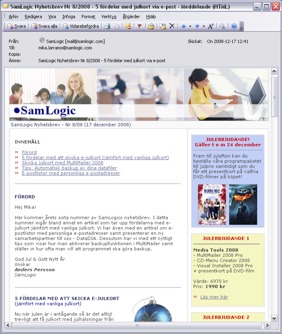
| A newsletter created with
HTML. |
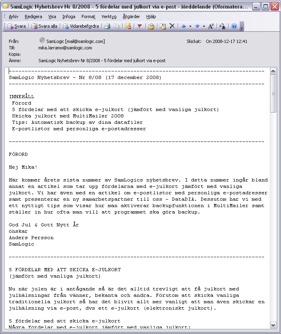
Same newsletter in plain
text. |
HTML newsletter
An e-mail newsletter created in HTML
gives the advantage of using images, colors, different fonts, frames,
enticing titles and sound effects. HTML also allows the use of
hyperlinks that enable the readers to go to a specific Internet site to
get more extensive information about a product or a
service etc.
Surveys show that newsletters created
in HTML have more readers than newsletters created in plain text, which is not surprising as HTML offers great possibilities to optimize
a newsletter. If you use the great advantages of HTML to design attractive
and appealing newsletters, readers are more likely to take a
closer look at the full content of your newsletter.
Newsletters created in HTML also have the
advantage of offering marketing professionals a measuring tool, where
they can see how many people have actually read the newsletter and how many
people have clicked on specific hyperlinks.
Creating the e-mail newsletter in HTML can strengthen your company’s graphical profile
An important advantage of e-mail newsletters created in HTML is that the graphical profile of the company
can be reinforced by using the same images, colors, fonts, logotypes
etc., that are used in the traditional marketing material. Articles in
high-class, regular newsletters, containing interesting information for
the reader, are read strikingly often. This in turn provides an
excellent opportunity to graphically expose the reader, including those
who only skim through the newsletter, to the company logo and trademarks
during a relatively long period of time.
Newsletter in plain
text
An e-mail newsletter created in plain text can be
perceived as boring by the reader. However, they have the
big advantage of reaching the recipients more often and are always
readable in the reader’s e-mail client. Newsletters created in HTML can
sometimes be blocked by anti-spam filters, because the filter sometimes
mistakenly recognises them as spam. HTML newsletters are also challenged
with the disadvantage that they are not always readable in certain
e-mail clients, and some users have also turned off the possibility to
view images in e-mails. Moreover, some security software, such as Norton
Internet Security, can sometimes prevent images from being displayed.
Advantages vs.
disadvantages
Below we have listed some of the
advantages and disadvantages of the HTML and plain text format:
HTML newsletter - Advantages
-
It is possible to design an attractive and appealing newsletter that really makes the reader react and take
action.
-
It is possible to design newsletters in conformity
with the company’s graphical profile. The company’s
logotype, for example, can always be displayed, and if the
company uses certain colors and fonts in their traditional
marketing materials, these can be reused in the e-mail as
well.
-
Newsletters created in HTML, with different fonts,
colors, images, headlines, etc., are significantly more
attractive which in turn generates more readers.
-
The HTML format offer a possibility to measure how many
newsletters have been read and how many recipients have clicked
on specific hyperlinks in the letter. You can often also
examine who has read the newsletter and who has clicked on
the links.
HTML newsletter - Disadvantages
-
Anti-spam filters can block HTML newsletters and there are some
companies that do not even accept e-mails in the HTML
format.
-
There are a lot of e-mail programs (e-mail clients) that can
not read HTML-based e-mails, especially the viewing of
images can be a problem for some. Furthermore, positioning
of text and use of graphical frames in an e-mail can cause
viewing difficulties in some e-mail programs.
-
In case the user opens the newsletter in offline mode, and if
the images are on a server on the Internet, the images will
not be available for viewing.
-
Someone at the company must have the knowledge and time to
create HTML-based newsletters. Alternatively this can be
outsourced, which in turn will generate increased costs.
Plain text newsletter -
Advantages
-
It is easier and less time-consuming to create newsletters that are plain text-based.
-
All e-mail programs (e-mail clients) can read plain
text-based newsletters.
-
Anti-spam filters are more flexible towards, and more likely
to allow, plain text-based e-mails. You can also reach users
at companies that have network servers that block HTML-based
e-mails.
-
It takes less time to download a plain text-based e-mail
message; the e-mail size is much smaller. This is a huge
advantage for those who has a slow internet connection (e.g.
a dial-up modem).
-
A newsletter created in plain text can be more easily read
in mobile phones (cell phones). For example the line width
will be automatically adjusted after the display of the mobile
phone.
Plain text newsletter -
Disadvantages
-
You can not create as appealing newsletter as with HTML. You
can not use images,
colors, different fonts, etc with plain text newsletters.
And you can not create
attractive headlines in the same way as in HTML, because the font size
and font color is always the same.
-
It is not possible to include clickable hyperlinks, and
clickable hotspots, in an e-mail
message. Some e-mail clients will automatically convert an
Internet address to a clickable link, but this can not be
guaranteed.
-
There is no good way to measure how many actually read the
newsletter.
|
As you have read above, there are a lot
of things to consider when making the decision whether to use HTML
or plain text for your newsletter. You should ask yourself what your
goal is and what you want to accomplish with your newsletter,
and choose format thereafter. Alternatively, you can let the recipient
choose the format.
Let your reader choose the
format
If you have the resources, and if it
is contextually appropriate, you can also let the reader decide which
format he/she prefers. The disadvantage is, of course, more work for you
to do; you must enter same, or nearly same, text twice. This way you
would, however, get more readers. One way to go about this method is to
create a simplified plain text-based newsletter, containing the
most important information, along with an Internet address (URL) and an invite
to visit the web page for an HTML-based version of the newsletter.
Do you want to read more articles
and tips?
If you want to read
more articles and tips about e-mail newsletters and related topics you can
follow us on
Facebook or
Twitter, or subscribe on our
newsletter. You can also read our
blog. |
|
|
Related products:
SamLogic
MultiMailer
Other articles
More articles are available from the
article index page.
|

|