CONTENT
 Foreword Foreword
Why
make an autorun menu interface for a CD or DVD?
Tip:
Personalized icon for the CD / DVD / USB stick
Tip:
Different text colors for buttons
Frequently
Asked Questions (FAQ)
Ubisoft
used CD-Menu Creator to create a game menu interface
|
FOREWORD
This is the first special newsletter of three for those who had
tried or bought CD-Menu Creator from SamLogic Software. The
newsletters will contain articles and practical tips about CD-Menu
Creator. The newsletter will also contain links to videos that
covers CD-Menu Creator and how to use the program.
First in this newsletter, in a short article, we explain why you should add a menu
interface to a
CD or DVD that is distributed to customers, and give some examples of uses for it. Then we present two
practical tips for SamLogic CD-Menu Creator. The first tip
shows how to create a customized icon for a CD, DVD and USB stick. The second
tip shows how to specify unique text colors for buttons in a menu.
Finally you can read about how one of the world's largest
game developers, Ubisoft Entertainment, created a menu with SamLogic
CD-Menu Creator to present content on a USB stick in an easily comprehensible
format.
If you have questions about SamLogic CD-Menu Creator or have comments
on the newsletter, please feel free to contact me.
Sincerely,
Anders Persson
SamLogic
|
WHY
MAKE AN AUTORUN MENU INTERFACE FOR A CD/DVD?
When you distribute information via a CD or DVD
you have two problems to handle: how do you make it easy for your
end-users to access the contents and how do you present the
information in a professional way?
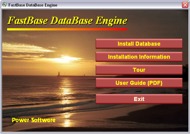 The
solution is to make a graphical menu interface that is shown
automatically on the screen when the user inserts the disc. By adding links
or buttons to the menu,
that you attach to applications, documents and sub menus etc.,
you will create an interface that makes it easy for users to
navigate to a specific file. And by using graphics, movies, and
sound the contents can be presented in a professional way. The
solution is to make a graphical menu interface that is shown
automatically on the screen when the user inserts the disc. By adding links
or buttons to the menu,
that you attach to applications, documents and sub menus etc.,
you will create an interface that makes it easy for users to
navigate to a specific file. And by using graphics, movies, and
sound the contents can be presented in a professional way.
Standardized interfaces enhances product & company profiles
When
your customers insert your CD or DVD in their
 computers
so is the menu the first impression they will get about your company
and products. By creating standardized and well-designed interfaces for the
information you distribute, your product and company
profile will be enhanced. computers
so is the menu the first impression they will get about your company
and products. By creating standardized and well-designed interfaces for the
information you distribute, your product and company
profile will be enhanced.
If you create series of menus that you use as templates for your productions, where the basic design (colors, logos, fonts, header
text, background images) are maintained while the contents will be replaced,
you can make new discs and USB sticks very fast. This means that
you can very quickly deploy large amounts of information and the recipient
of the media will still be able to find the right information without
any problem because the interface is familiar.
Many uses
Menu interfaces for CDs and DVDs have many uses. They can for
example be used to present catalogs, reports, course information, statistics, surveys, corporate and product presentations, photographs,
music and software.
SamLogic CD-Menu Creator
SamLogic CD-Menu Creator is a tool that allows you to quickly and easily
make the
above. The software provides an easy way to combine great design with
advanced technology without have any prior knowledge of programming
or design. The menu interfaces can contain buttons, links, images,
texts, sounds and movies etc. From the buttons you can launch applications,
open documents & Internet pages, view photos, play movies, play
music and more.
 More
information about SamLogic CD-Menu Creator More
information about SamLogic CD-Menu Creator
|
TIP: PERSONALIZED
ICON FOR THE CD / DVD / USB STICK
With
SamLogic CD Menu Creator you can replace the Windows default
icon for the CD / DVD / USB stick (the icon that appears in Windows Explorer)
with your own customized icon. The icon can be for example a product
logo.
In this tip we will show you how to replace the default icon for a
disc or drive in Windows:
How
to create a personalized icon for your CD / DVD / USB stick |
TIP: DIFFERENT TEXT
COLORS FOR BUTTONS

It is possible to specify unique text colors for buttons in a menu. For example, the
Exit button can have a different
text color than the other buttons, so it can be easier located in a
menu.
In this tip we will show how to give one button another text color
than the other buttons in the menu.
How
to set different text colors for buttons
|
FREQUENTLY ASKED
QUESTIONS (FAQ)
 There
is a FAQ page available for
SamLogic CD-Menu Creator. On the page you will find answers to both
general questions and questions about specific functions in the
program. Below
are some of the most common questions listed (and the answers): There
is a FAQ page available for
SamLogic CD-Menu Creator. On the page you will find answers to both
general questions and questions about specific functions in the
program. Below
are some of the most common questions listed (and the answers):
Q: What's the difference in function between the full version and
the demo (trial) version?
A: The demo (trial) version only works for 30 days and there is an
information text ("SamLogic CD-Menu Creator 2012 - Demo") on the
created menu interfaces. This information texts is removed in the
full (paid) version. The menus created with the demo version are
fully functional also after 30 days, but no new menus can be created
when the time is up.
Q: What's the difference in function between the full version and the
shareware version?
A: The shareware version only works for 30 days and there is an
information text ("Created by SamLogic CD-Menu Creator...") on the
created menu interfaces. This information texts is removed in the
full (paid) version. The menus created with the shareware version
are fully functional also after 30 days, but no new menus can be
created when the time is up.
Q: If I buy a license of SamLogic CD-Menu Creator. Is there any additional
costs, for example must I pay some fee for every menu I distribute?
A: No. There are no additional costs. When you have bought a license
of SamLogic CD-Menu Creator you can use the tool to create and distribute
so many menus you want.
Q: In how many computers can I install one license of SamLogic CD-Menu
Creator?
A: The license is per user. So if you, for example, need to install
SamLogic CD-Menu Creator both at your office and in your home you can
do it. If another user want to use CD-Menu Creator he/she must buy a
new license.
SamLogic
CD-Menu Creator - Frequently Asked Questions
|
SEND
NEWSLETTERS WITH SAMLOGIC MULTIMAILER
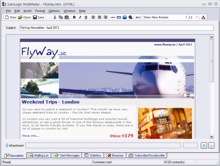 With
SamLogic MultiMailer you can design and send newsletters to your
contacts. MultiMailer can also be used to send other types of
e-mails, as e-cards, querys and pressreleases etc. With
SamLogic MultiMailer you can design and send newsletters to your
contacts. MultiMailer can also be used to send other types of
e-mails, as e-cards, querys and pressreleases etc.
The program can handle e-mail bounces and subscribe / unsubscribe
requests from customers. MultiMailer can import data from other
databases and CRM systems.
Read
more about MultiMailer |
UBISOFT USED CD-MENU
CREATOR TO CREATE A GAME MENU
CD-Menu Creator can create menu interfaces for various purposes, for
example for application installations, utility programs and business
presentations. Another use is graphical menu interfaces for software
games.
One of our clients, the game development company Ubisoft Entertainment, used SamLogic
CD-Menu Creator when they needed to quickly deploy 5 Adobe Flash games
and 3 movies on a USB stick. The picture below shows how the menu looked like.

The end-user group were children who needed a simple and intuitive interface.
By clicking on one of the pictures on the menu they started either a
Flash game or a movie. The menu was shown on the screen when the USB
stick was put in the USB port.
Built-in support for Adobe Flash
CD-Menu Creator has built-in Adobe Flash support. This means that no
external Flash player needs to be deployed with your disc or USB
flash drive. Everything is handled by CD-Menu Creator.
 Ubisoft
Entertainment Ubisoft
Entertainment
Ubisoft is a game developer and game distributor with headquarters in Montreuil,
France. The company was founded in 1986 and has over 4,500 employees.
The Ubisoft game directory labels game series such as
Myst, Brothers in Arms, Prince of Persia and Tom Clancy's Splinter Cell.
More examples of game menu interfaces
More examples of game menu interfaces designed with CD-Menu Creator
can be seen on this video on YouTube:
http://www.youtube.com/watch?v=mSc6M2Ol-80
More information about CD-Menu Creator
For more information about the designer tool CD-Menu Creator, visit the product
page for
SamLogic
CD-Menu Creator.
|
|
|
Order the latest
CD-Menu Creator 2012!
The latest version of
the menu designer tool CD-Menu Creator is 2012. This version
supports Windows 8 & 64-bit Windows. The menus that are distributed
are code signed which allows distribution to restricted
environments.
|
|
|